- 1 GAME OBJECTIVES
- 2 GAME RULES
- 2.1.1 card ranking
- 2.2 Betting instructions
- 2.3 Payouts
- 2.4 Limit Ranges
- 3 GAME STATISTICS
- 4 SETTINGS
- 4.1 Video Settings
- 4.2 Audio Settings
- 4.3 Default settings
- 4.4 Chips settings
- 5 BETTING HISTORY
- 6 ERROR HANDLING
- 6.1 Disconnections
- 6.2 Canceled games
- 7 OTHER ELEMENTS
- 8 COMPLIANCE
GAME OBJECTIVES
The objective of Hi-Low is to predict the winning card of the game round. It is played with six card decks that are stored in a shuffling machine. To win, you need to predict if the next card will be higher, lower, or of the same value as the base card of the round. You can also choose to bet on other betting positions on the table.
GAME RULES
When the first game round starts, three cards are burned, and the fourth card is placed on the base card position on the table.
A round begins when there is a base card in front of the dealer.
After the game round is over, the three burned cards are returned into the shuffling machine along with the base card, where they are immediately shuffled. The result card of the round becomes the base card for the next round.
If you lost the round, the bet amount is taken off the table. If you won the round, the winnings are added to your Balance.
If the base card is a 2, the Lower position on the table is disabled. If the base card is an Ace, then the Higher position is disabled. Also, the 10-value card is not present in the game deck.
If it is possible to bet an amount that could potentially result in a win larger than the maximum payout limit, then the bet is automatically adjusted to the maximum possible amount for this position.
card ranking
The ranking of cards is, from lowest to highest: Ace, 2,3,4,5,6,7,8,9,10, Jack, Queen, King where Ace is "1" and King is "13"
Betting instructions
If a game round is in progress when you enter the table, please wait for the next one, and then, place your bets.
To place a bet, choose a chip and place it on the betting position.
You can place several chips on different betting positions simultaneously.
The timer in the game window shows how much time you have left to place your bets.
You must confirm your bet. This can be done either manually, by using the Confirm button after each bet, or automatically at the end of betting time. If your service provider has enabled auto-confirmation, it is on by default and the Confirm button does not appear. You can switch the feature off in-game settings.
After the No More Bets signal, the game round begins.
Winnings are paid for the winning bets at the end of each game round.
To play a game round, place your bets again or use the Rebet button.
To skip a turn, simply do not place any bets on the table.
main bets
Dragon Tiger have several betting possibilities:
High
Low
side bets
6, 7, 8, 9 |
King, Ace, Jack, Queen |
Black |
Red |
2, 3, 4, 5 |
Payouts
Your payout depends on the type of bet placed.
Position name | Description |
Higher | Winning card is higher than the card on the table |
Lower | Winning card is lower than the card on the table |
Snap | Winning card is equal to the card on the table (independent of the suit) |
6, 7, 8, 9 | Winning card is 6, 7, 8, 9 |
King, Ace, Jack, Queen | Winning card is a King or JAck or Queen or Ace (independent of the suit) |
Black | Winning card is of the black suit (spades or clubs) |
Red | Winning card is of the red suit (hearts or diamonds) |
2, 3, 4, 5 | Winning card is 2, 3, 4 or 5 (independent of the suit) |
Please note that any malfunction voids the game round and all eventual payouts for the round. Bets will be returned.
Limit Ranges
The limit displayed next to the table name in the Lobby and on the game table UI is the minimum bet limit allowed at the table. The Limits panel in the game menu also shows info about the maximum payouts.
GAME STATISTICS
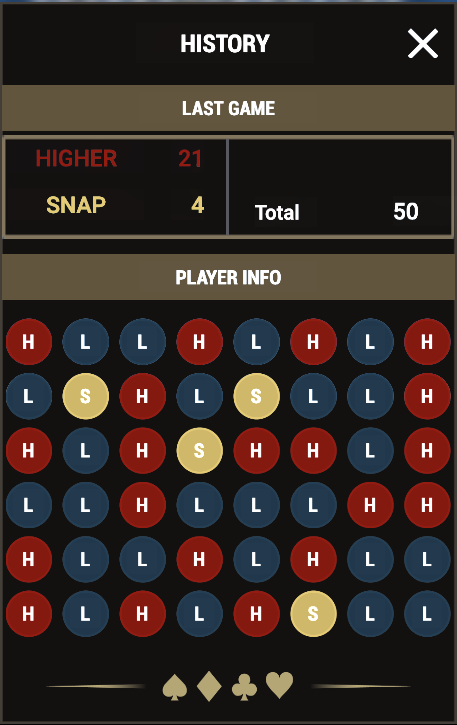
By opening from side menu GAME STATISTICS last 46 rounds statistics is displayed
SETTINGS
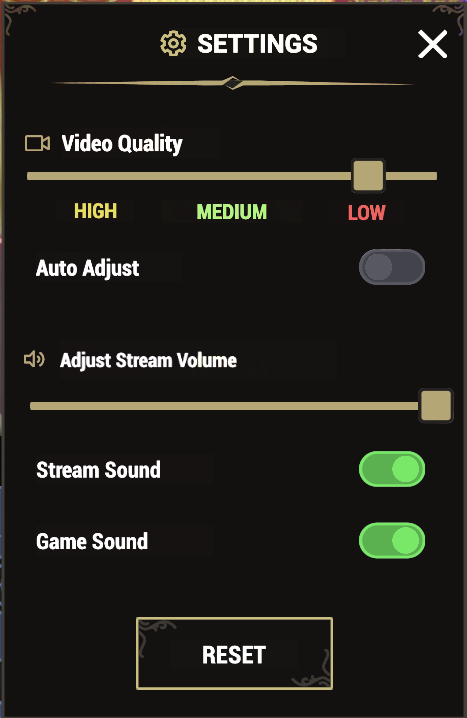
The settings button launches a menu of user-changeable settings.
Video Settings
It includes Video quality settings. Your video quality is auto-adjusted, but you can manually change your video quality by selecting the specific stream.
Audio Settings
It is possible to adjust:
Stream volume can be adjusted by slider
Mute stream sound
Mute game sounds
Default settings
In order to revert setting to default one, RESET button can be used.
Chips settings
Separate settings for setting chips value is situated in main menu. This settings allow adjusting value of each chip.
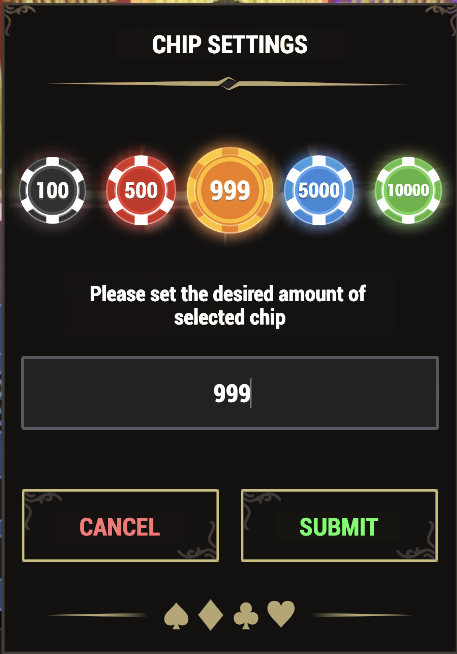
To adjust the chip value, PLAYER need to click on chip which wants to adjust, enter desired value and SUBMIT.
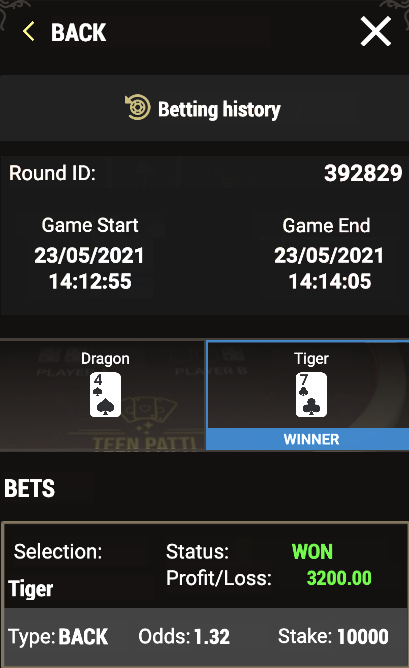
BETTING HISTORY
Betting history menu returns the list of all stakes made in all of the casino games.
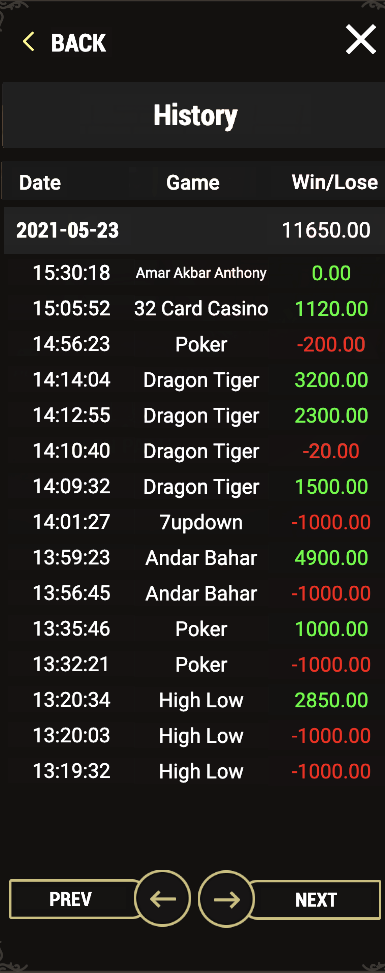
Detailed view of each played round is accessible by clicking on the element from the list.
ERROR HANDLING
If there is an error in the game procedure, the game round will be temporarily paused and the shift manager will be notified. Players will be notified by an on-screen pop-up message, to notify the player that the issue is in the process of investigation. If the manager can immediately resolve the error, the game round will continue as normal. If immediate resolution is not possible, the game round will be canceled and initial bets will be refunded to all players who participated in the game round.
Disconnections
In the event that a disconnection occurs before bets are placed, i.e. before the 'SUSPENDED' message on the screen, the bet will not be deducted from the balance and the player will not participate in the game round. Once reconnected, please verify your balance and inform your casino operator immediately if there are any issues.
In the event that a disconnection occurs after a game round begins, i.e. after the 'SUSPENDED' message on the screen, we do not guarantee that your bet was placed. Please verify with your casino operator to assure the balance is correct. If the bet was placed, the game will proceed as normal and the winnings will be processed according to the game result regardless of the disconnection. Please note the following exceptions:
A disconnection message might not be displayed to the player, and all decisions will proceed as the default decision.
In the event that a client disconnection occurred while playing the game, regardless of the status of the game, please make sure to review your balance after the reconnection and contact your casino operator if there is a problem.
Canceled games
A game round can be canceled by the dealer if complications occur and disrupt the game session. In such cases, all the players who are currently at the table are notified of the cancellation and all bets are returned to their accounts. Canceled game rounds are marked with an X.
When the game round is canceled, the current base card is removed from the table and a new base card is dealt.
OTHER ELEMENTS
ICON | Description |
|---|---|
 | Game sounds ON / OFF |
 | Back To Lobby |
 | Dealer Name |
 | Open Main Menu |
 | Total betting amount of the round |
 | PLAYER wallet amount |
 | Unique round identificator |
 | Opening side bets menu |
 | Opening round stakes |
 | GAME messages |
 | Betting time countdown |
COMPLIANCE
All casino compliance should be redirected to Operator PLAYER is registered at. For faster solutions, please provide to the operator GAME ID and description of the problem.